How to Build a Home Golf Simulator: Start-to-Finish Setup Guide
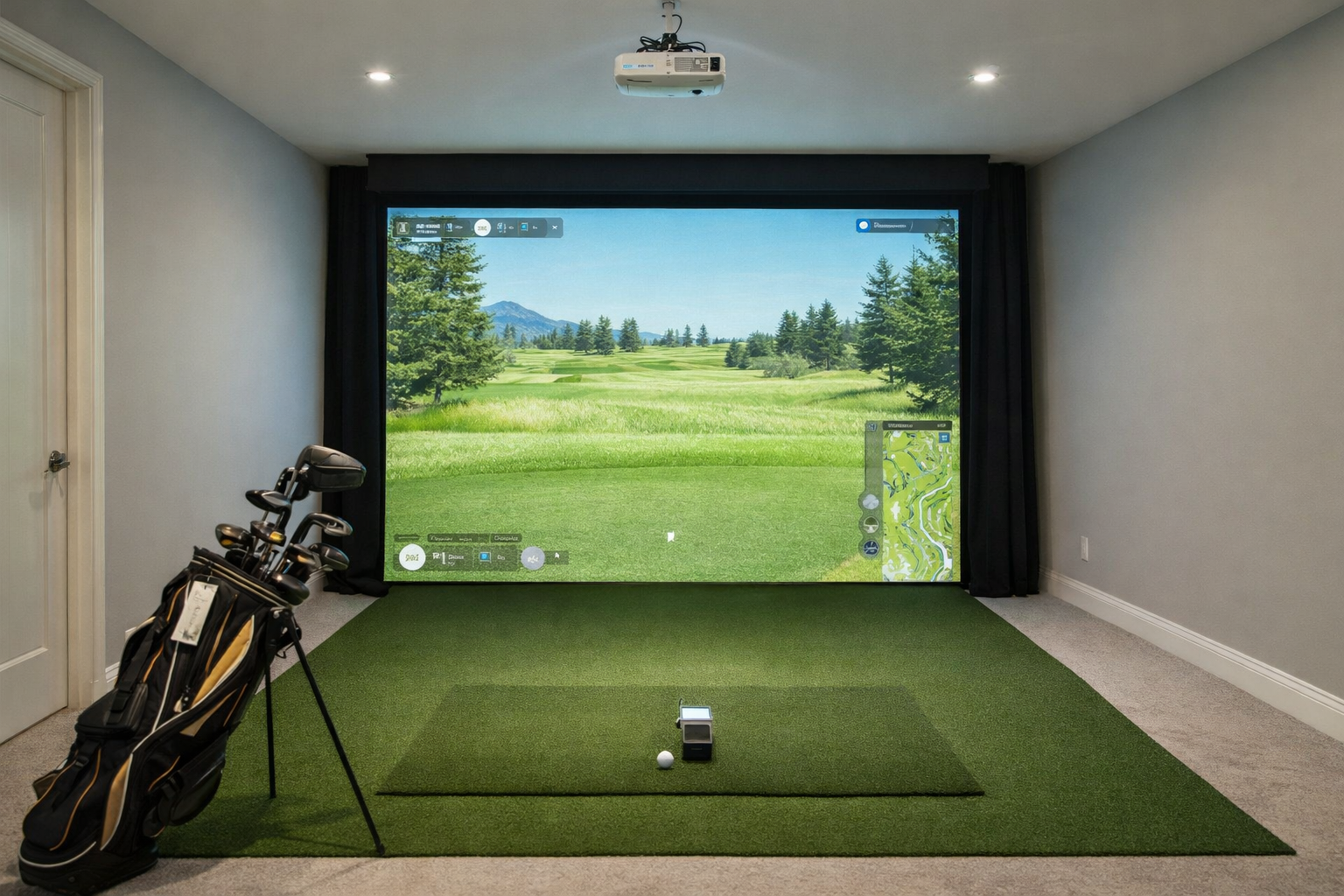
A home golf simulator works best when it is planned like a room project, not a shopping cart. The right order is room first, swing safety second, launch monitor third, and display or software after the basics are settled.
Quick build path
- First decision: whether the room can safely handle full swings.
- Second decision: net, impact screen, enclosure, or retractable setup.
- Third decision: the launch monitor that fits your depth, lighting, and setup style.
- Last decision: projector, TV, tablet, simulator software, and finishing touches.
Some pages on this site may include affiliate links. Recommendations are based on room fit, budget realism, and who each setup actually makes sense for. Read the affiliate disclosure.
Step 1: Measure the room before choosing gear
Measure ceiling height, usable width, total depth, door tracks, lights, beams, shelves, and the spot where the golfer will actually stand. A simulator room is not just the wall-to-wall dimension. It is the usable swing and ball-flight space after real obstacles are accounted for.
Minimum
The setup technically fits, but club choice, stance, screen size, or monitor type may be compromised.
Workable
You can use the room regularly with realistic tradeoffs and the right monitor/display choices.
Comfortable
The room feels natural enough that you are not steering the swing around walls, ceilings, or projector shadows.
Step 2: Decide how permanent the setup should be
A spare-room net setup, a garage retractable screen, and a finished basement enclosure are different projects. Permanent builds are cleaner and easier to use, but they cost more and demand better room planning. Temporary builds are cheaper and flexible, but setup friction can kill usage.
| Setup type | Best for | Watch out for |
|---|---|---|
| Net-only bay | Practice, budget builds, renters | Less immersive, display may be separate |
| Impact screen | Projector simulator feel | Screen size, projector throw, side protection |
| Full enclosure | Dedicated rooms | Width, depth, ceiling, shipping and install cost |
| Retractable setup | Garages and shared rooms | Mounting, alignment, repeatable setup |
Step 3: Choose the launch monitor around the room
This is where many builds go wrong. Radar units often want more depth behind the ball and more ball flight. Camera/photometric units can be easier indoors because they sit near the hitting area. Overhead units can clean up the floor but usually make sense only in more permanent rooms.
Room-fit launch monitor paths
Space by launch monitorPhotometric vs radarOverhead vs floorSmall-space launch monitors
Step 4: Do not cheap out on the hitting surface
The mat is not the exciting purchase, but it is one of the pieces you feel on every shot. A bad mat can make practice unpleasant, punish joints, and make the whole build feel cheaper than the launch monitor price suggests.
Step 5: Pick net, screen, enclosure, and projector as one system
Projector placement, screen aspect ratio, hitting distance, side protection, and ceiling height all interact. A projector that looks fine on paper can still create shadows, miss the screen shape, or force awkward mounting in a garage.
Projector and screen planning
Best projectorsProjector placementAspect ratioWithout a projector
Step 6: Choose software after hardware fit is clear
Simulator software matters, but it should not rescue a poorly planned room. Confirm that the launch monitor works with the software you care about, then think about courses, subscriptions, device compatibility, and how much hassle you will tolerate before each session.
Good, better, best build paths
Good: practice-first
Launch monitor, quality mat, strong net, phone/tablet or TV. Best when budget and space are tight.
Better: screen bay
Launch monitor, mat, impact screen or enclosure, projector or TV. Best for most committed home users.
Best: dedicated room
Permanent enclosure, higher-end monitor, projector planned around the screen, turf, side protection, and clean cable management.
Common mistakes to avoid
- Buying the launch monitor before confirming room depth.
- Treating a minimum dimension as a comfortable dimension.
- Forgetting projector throw, shadows, and aspect ratio until late.
- Spending big on tech while using a poor mat or unsafe net.
- Building something that takes too long to set up for casual practice.
Bottom line
The best home golf simulator is not simply the most expensive setup. It is the setup that fits your room, takes little enough effort to use often, and puts money into the parts that affect your actual experience.
Plan the room, then choose the gear.
More beginner and budget setup paths
If the budget is still unsettled, use the budget guides to separate true starter builds from more complete simulator rooms.
Beginner simulator setupsSimulator setups under $5,000Simulator under $1,000
Mevo+ and software decision guides
These are useful if you are comparing radar launch monitors or trying to decide how much simulator software matters in the build.
Is Mevo+ worth it indoors?Mevo+ space requirementsGSPro vs E6 Connect